Under my github account (https://github.com/addumb): I open-sourced python-aliyun in 2014, I have an outdated python 2 project starter template at python-example, and I have a pretty handy “sshec2” command and some others in tools.
- --> My Local-only shitty AI opportunistic doorbell camera explainer explainer
- The Cost of 4K 60fps video storage, a dad's perspective (2021-2-20)
- Mobile App Operability (2020-7-15)
- I don't write (2019-10-30)
- I moved addumb.com into GitHub pages (2016-3-7)
- Quick Debian Backporting (2014-3-10)
- Considering different data systems? (2013-11-15)
- I Moved Addumb.com into AWS (2013-3-18)
- Truth In Distributed Systems (2012-2-24)
- Updated: MySQL 5.0 and 5.1 Side-By-Side (2011-3-2)
- MySQL Duplicate Key Error - InnoDB or MyISAM? (2011-1-20)
- Linux Tip: awesome and synergy for less mouse/keyboard switching (2011-1-12)
- vim and bash (2010-12-7)
- Linux Tools (2010-10-10)
- Linix tip - stderr skips pipes (2010-7-19)
- ndislocate - A distributed service locator, written on top of Node.js (2010-6-17)
- I want a tattoo (2010-5-17)
- Red Hat Enterprise Linux 5.5 released (2010-3-30)
- HP ProLiant Linux repositories (2010-3-24)
- Linux tip 4 - bash history timestamps (2010-3-8)
- Devops (2009-11-25)
- While I wait for the locksmith... (2009-10-24)
- Linux tip 3 - rsync gotchas (2009-10-22)
- Linux tip 2 - read (2009-10-22)
- Linux tip - du versus df (2009-10-12)
- MySQL Slave Initialization Do's and Dont's (2009-7-5)
- What am I doing? (2009-5-25)
My Local-only shitty AI opportunistic doorbell camera explainer explainer
December 06, 2025
tl; dr: For today at least, I use Home Assistant’s HACS integrations for vivint (my home security system), ollama-vision (I don’t know wtf this means), and my Windows gaming PC which has an RTX 5080 (16GB VRAM) to give a slow, inaccurate, and unreliable description of who or what is at my front door based on AI magicks’ing my doorbell camera. It takes around 3 seconds usually, sometimes far less (600ms) and sometimes far more (6 fucking minutes). But it is 100% completely self-hosted and bereft of subscription fees, though thus wildly unreliable.
Send the classic “somebody is at your front door” notification, but with genAI slop trying to roast you when you get home:
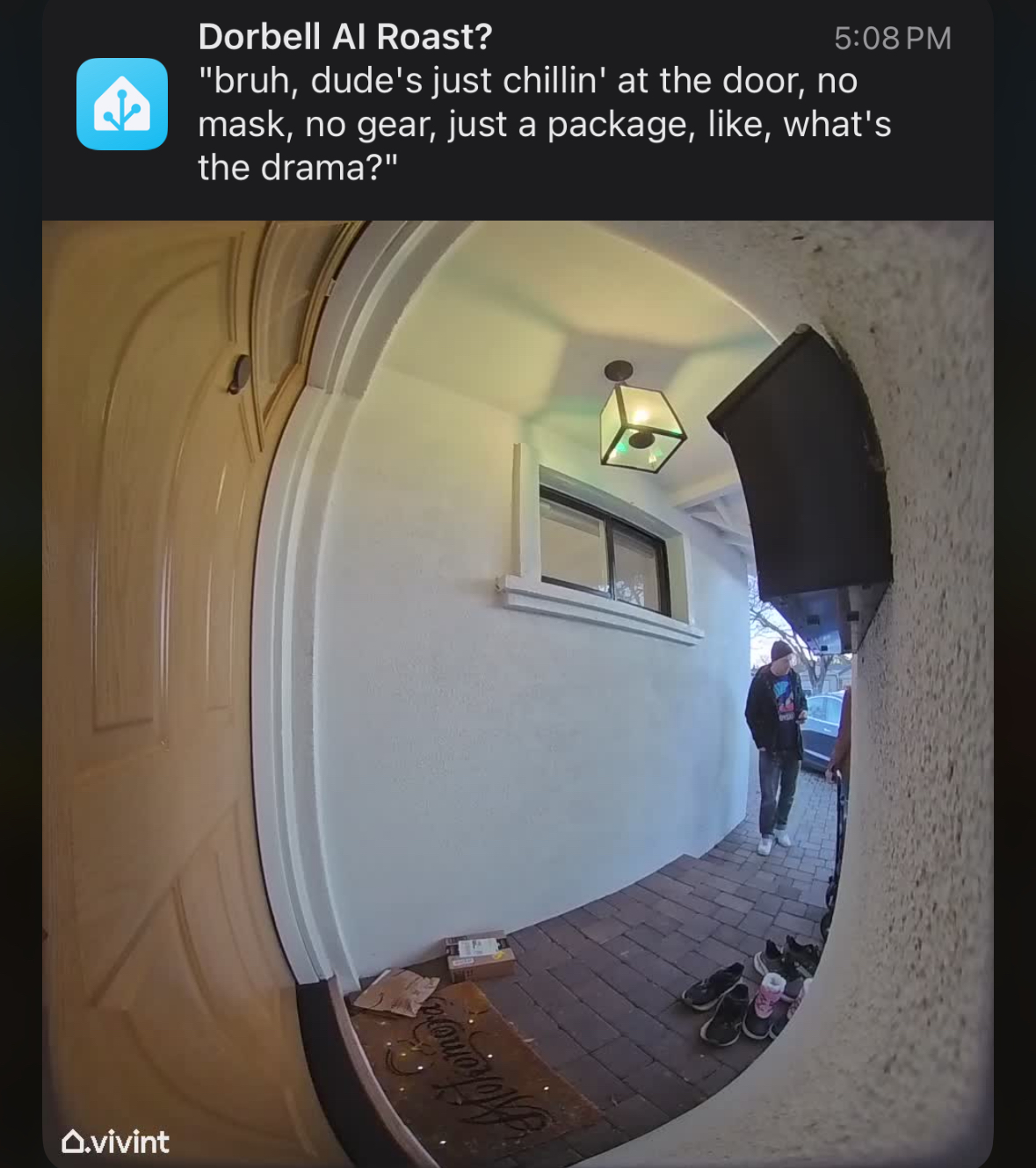
While 100% self-hosted on your own network on mostly open source stuff. On Linux the closed-source NVIDIA drivers are required for ollama to be useful.
I don’t know what MCP is, I don’t know what “local inference” means and I don’t give a shit and that’s my problem professionally, but not personally. I want shitty automated jokes about people at my door delivered to my phone within a few mintues maybe. I don’t know in any detail what llama3.2-vision means and how it compares to anything else listed on ollama models lists. I’m not a luddite, I’m just a human bean and not super excited about techno-fascists sending obviated labor to prisions via a few trivial intermediate steps.
- Run Home Assistant on a NUC in your closet or garage, your “MPoE.” Don’t think about it.
- Have fun gaming on a PC with a “decent” (read: great) GPU.
- Use your PC as a space heater to give some laughs.
Get to the point:
I’d been considering buying an additional mini PC from my ~$1K ASUS NUC 14 Pro with 128G-fuckin-B of RAM, a ~$2K AMD Ryzen AI Max+ 395 system like the Framework Desktop due to its unified memory, giving the integrated GPU something like 72G-fuckin-B of VRAM. But I already have a gaming PC with which also cost me $2K, so why can’t I try that paltry 16GB VRAM GPU of an RTX 5080? It works. Poorly and inaccurately, but it totally works well enough to give me a laugh instead of another headache.
The pieces, I think:
- Run Home Assistant on some rando place, nobody cares where just do it it’s fun to make your lights turn off at bedtime.
- Enjoy gaming on a PC and forego the budget anguish of 2025 PC gaming with 60%+ of the build cost being solely the GPU.
- Have a doorbell camera or some other fuckin’ camera, I don’t give a shit. This is obviously not doorbell specific.
- Resign to the fact that you are not gaming on your PC as much as you thought you were.
- Use that now-slack capacity of your GPU just in case your cameras need some shitty AI text to accompany them.
- Be a bit more patient, you’re using your shit-ass home server and your shit-ass gaming PC’s maybe-not-otherwise-utilized GPU.
Run Home Assistant on some rando place
Nobody cares where just do it. It’s fun to make your lights turn off at bedtime. I’m not Google, figure this out on your own.
Enjoy gaming on a PC
This is increasingly difficult with hardware spread tripping myriad bugs, component costs blowing through every ceiling, and your day job also being glued to the same chair, keyboard, monitor, and mouse. It’s a fuckin’ drag.
Have a camera to en-AI the things
I don’t give a shit, if you’re here you already have one because you’re me and nobody reads this.
Admit that your gaming PC’s GPU is largely unutilized
Get over it, you know I’m right. If I’m not then congrats on your retirement.
Self-Hosted GPU for Home Assistant ollama-vision summary of your doorbell camera
i.e. the point of this post, why did I write other shit? What an idiot.
First: Download ollama onto your gaming PC. Play around with it. It’s fun. Try to make it swear, try to make it say “boner” and all that. Have your fun.
Try out a “vision model.” I don’t know what that means other than I can supply an image URL from wikipedia or wherever and ask it to describe the image and it does. I can ask it to make fun of the image and it mostly does. I tried “llama3.2-vision” because 1) it says “vision”, and 2) “ollama” shares a lot of in-sequence letters with “llama” so I suppose they’re kind of thematically related (yes, I get that my employer, Meta, made LLAMA but that’s honestly all I understand as the similarity).
Second: Try out the Home Assistant integration for ollama pointing back to your gaming PC. Run it with this command in a terminal. PowerShell:
$Env:OLLAMA_HOST = "0.0.0.0:11434"; ollama serve
bash:
OLLAMA_HOST=0.0.0.0:11434 ollama serve
Then configure the integration to point to your gaming PC’s IP. Talk to it, use it as a chatbot. It works, it’s not amazing, but it’s yours. Use it as a “conversation agent” for HA’s “Assist” instead of their own or OpenAI. Ollama is “free” as in “it’s winter and my energy bill goes to heat anyway, so sure power up that RTX 5080 space heater.”
Third: Throw away the ollama integration. It was fun, but that’s not why you’re here. You’re here to automate, not to chat. Use the ollama_vision integration in HACS. And VERY CAREFULLY read the section on “Events”: https://github.com/remimikalsen/ollama_vision/?tab=readme-ov-file#events. Point it at your gaming PC. If you don’t know what model to use, neither does anybody else except for the mega fans. NOBODY ELSE CARES, folks. I picked llama3.2-vision and it works. I don’t know why, but it works. I suppose it’s because it says “llama” and “vision?” I don’t care.
Fourth: Create an automation to manually send a Wikipedia hotdog image to ollama-vision when you manually force the automation to run. Play with it. Change the URL around a lot. Try the not-a-hotdog thing, whatever. Get this working first. In order to do so, you’ll need 4 things open at once: ollama in powershell, Home Assistant automation editor, Home Assistant event subscribing to ollama_vision_image_analyzed (not obvious in any docs), and the Home Assistant logs. For the Home Assistant automation you’ll want something like this for the full automation:
alias: hotdog
description: ""
triggers: []
conditions: []
actions:
  - action: ollama_vision.analyze_image
    metadata: {}
    data:
      prompt: Is this a hotdog?
      image_url: >-
        https://www.w3schools.com/html/pic_trulli.jpg
      device_id: XXXXXXXXXXXXXXXXXXXXXX
      image_name: hotdog
Hint: that wikipedia hotdog URL doesn’t work but https://www.w3schools.com/html/pic_trulli.jpg does and it’s not a hot dog nor a penis.
Errors I hit:
- Home Assistant logs showed an HTTP 403 error when fetching an image by URL (like the Wikipedia hotdog image). Solution: use a different test image URL.
- Formatting yaml is fuckin’ dumb so of course everything is always wrong at first. Solution: git gud.
- Can’t see how it all hops across from manual press -> image fetch -> ollama GPU stuff -> notification. Solution: really seriously open all 4 of those things in one screen, 1/4 each.
Fifth: Once you have not-a-hotdog working, you should see something in the Home Assistant event subscription UI on ollama_vision_image_analyzed like this:
event_type: ollama_vision_image_analyzed
data:
  integration_id: XXXXXXXXXXXXXXXXXXXXXX
  image_name: hotdog
  image_url: https://www.w3schools.com/html/pic_trulli.jpg
  prompt: Is this a hotdog?
  description: >-
    No, this is not a hotdog. This is a picture of a traditional Italian village
    called Alberi, located in the region of Pugli in Italy. The village is known
    for its unique architecture and is often referred to as the "trulli"
    village. The trulli are small, round, and cone-shaped houses made of stone
    and are typically found in this region. The village is also known for its
    beautiful scenery and is a popular tourist destination.
  used_text_model: false
  text_prompt: null
  final_description: >-
    No, this is not a hotdog. This is a picture of a traditional Italian village
    called Alberi, located in the region of Pugli in Italy. The village is known
    for its unique architecture and is often referred to as the "trulli"
    village. The trulli are small, round, and cone-shaped houses made of stone
    and are typically found in this region. The village is also known for its
    beautiful scenery and is a popular tourist destination.
origin: LOCAL
time_fired: "2025-12-07T05:55:21.819316+00:00"
context:
  id: XXXXXXXXXXXXXXXXXXXXXXXXXXXXX
  parent_id: null
  user_id: null
Here your important information for the notification is “image_name” and “final_description”. You set “image_name” in the ollama-vision integration.
Sixth: Make an automation which triggers on your doorbell or motion, don’t care, and takes a camera snapshot. Then send that camera snapshot over to ollama-vision. For example, the full YAML for this trigger->ollama-vision automation is:
alias: Poke ollama vision
description: ""
triggers:
  - trigger: state
    entity_id:
      - binary_sensor.hotdog_motion
    from:
      - "off"
      - "on"
conditions: []
actions:
  - action: camera.snapshot
    metadata: {}
    data:
      filename: /config/www/snapshots/hotdog.jpg
    target:
      entity_id: camera.doorbell
  - action: notify.mobile_app_your_phone_name
    metadata: {}
    data:
      message: Motion at the hotdog
      data:
        image: /local/snapshots/hotdog.jpg
  - action: ollama_vision.analyze_image
    metadata: {}
    data:
      prompt: Is that a hotdog?
      image_url: >-
        http://homeassistant.lan:8123/local/snapshots/hotdog.jpg
      device_id: xxxxxxxxxxxxxxxxxxxxx
      image_name: hotdog
mode: single
This does a few things:
- triggers when the hotdog camera motion binary sensor switches from off to on (when there is motion detected).
- without condition (not a great idea)
- snapshot the camera to a location which is AN OPEN URL FOR ANYTHING AUTHENTICATED TO HOME ASSISTANT (also not a great idea)
- Notify your phone with that image so you can refer to it later
- Huck it off to your gaming PC’s ollama to hopefully maybe describe it unless you’re gaming.
Seventh: [EDIT] This is NOT separately, I learned how wait_for_trigger in automation actions lists then can have a trigger type of event which lets a later action reference a template value of wait.trigger.event. The prior version of this said to make an additional automation to catch the response. No need.
However, if you want to try it out to play with it, because this is all supposed to be fun to begin with, you’ll want to unpack the response event:
event_type: ollama_vision_image_analyzed
data:
  integration_id: XXXXXXXXXXXXXXXXXXXXXXXX
  image_name: hotdog
  image_url: https://www.w3schools.com/html/pic_trulli.jpg
  prompt: Is this a hotdog?
  description: >-
    No, this is not a hotdog. This is a picture of a traditional Italian village
    called Alberi, located in the region of Pugli in Italy. The village is known
    for its unique architecture and is often referred to as the "trulli"
    village. The trulli are small, round, and cone-shaped houses made of stone
    and are typically found in this region. The village is also known for its
    beautiful scenery and is a popular tourist destination.
  used_text_model: false
  text_prompt: null
  final_description: >-
    No, this is not a hotdog. This is a picture of a traditional Italian village
    called Alberi, located in the region of Pugli in Italy. The village is known
    for its unique architecture and is often referred to as the "trulli"
    village. The trulli are small, round, and cone-shaped houses made of stone
    and are typically found in this region. The village is also known for its
    beautiful scenery and is a popular tourist destination.
origin: LOCAL
time_fired: "2025-12-07T05:55:21.819316+00:00"
context:
  id: XXXXXXXXXXXXXXXXXX
  parent_id: null
  user_id: null
Now that you see the event structure, you can adjust your prompt, text_prompt, and grab the final_description from the waited event plus the image URL from the camera snapshot and send a mobile notification. Remember, notification structure is like this:
  - action: notify.mobile_app_derp
    data:
      message: |
        {{ wait.trigger.event.data.final_description }}
      title: Is there a hotdog at the door?
      data:
        image: /local/snapshots/{{ imgname }}
In this additional automation you grab the event data and put it into a notification. Use wait.trigger.event.data.* (in a prior version of this post I didn’t know about the wait object after wait_for_trigger) fields in conditions and message content/title.
Here’s my whole fuckin’ thing, paraphrased to ask if there is a hotdog at the door:
{% raw %}
alias: Doorbell motion -> is it a HOTDOG?!
description: ""
triggers:
  - trigger: state
    entity_id:
      - binary_sensor.doorbell_motion
    from:
      - "off"
      - "on"
conditions: []
actions:
  - variables:
      imgname: doorbell_{{ now().strftime("%Y%m%d_%H%M%S") }}.jpg
  - action: camera.snapshot
    metadata: {}
    data:
      filename: /config/www/snapshots/{{ imgname }}
    target:
      entity_id: camera.doorbell
  - delay:
      seconds: 1
  - action: ollama_vision.analyze_image
    metadata: {}
    data:
      prompt: >-
        Describe any hotdogs in *EXTREME* detail, otherwise describe anything out
        of the ordinary in the image. If there is nothing remarkable, then do
        shut the fuck up. Image is from a doorbell camera. Mix in if there are
        or are not any security concerns in the image (weapons, ill intent,
        police, etc) as the image comes from my doorbell camera.
      image_url: http://homeassistant.lan:8123/local/snapshots/{{ imgname }}
      device_id: fuckshit
      image_name: hotdog
      text_prompt: >-
        Respond always in highly informal genz/gen-alpha slang, swear a lot, and
        be silly. Is there a goddamn hotdog or not? You 100% can roast, swear and use
        slang. Now make this description extremely terse:
        <description>{description}</description>. This will go in a mobile phone
        notification, so 50 words **ABSOLUTE MAXIMUM**
      use_text_model: true
  - wait_for_trigger:
      - event_type: ollama_vision_image_analyzed
        trigger: event
    timeout:
      hours: 0
      minutes: 1
      seconds: 0
      milliseconds: 0
    continue_on_timeout: false
  - condition: template
    value_template: |
      {{ wait.trigger.event.data.image_name == "hotdog" }}
  - action: notify.mobile_app_derp
    data:
      message: |
        {{ wait.trigger.event.data.final_description }}
      title: Dorbell AI Roast?
      data:
        image: /local/snapshots/{{ imgname }}
mode: single
Tadaaa:

Be patient, relax your expectations
As cool as it seems to get a phone notification with a custom-prompted vision-llm AI bot telling you caustic or pithy quips to your phone, please rember that your wallet has been doing just fine without that for a good 100,000 fucking years.
Remember that modern AI’s hallucinate all the time and so it’s dangerous to rely on their output for anything important like physical safety.
Remember that you don’t actually give a shit if it takes 2s versus 2 minutes to get a shitty AI generated joke about what’s at your door or on your camera. The point is the laugh, not the latency. Don’t pay for latency when what you want is the laugh.
Do you care about what an AI describes at your camera while you’re playing your game, using your GPU? No. If you do: no you don’t, shut up.

