Under my github account (https://github.com/addumb): I open-sourced python-aliyun in 2014, I have an outdated python 2 project starter template at python-example, and I have a pretty handy “sshec2” command and some others in tools.
- My Local-only shitty AI opportunistic doorbell camera explainer explainer (2025-12-6)
- The Cost of 4K 60fps video storage, a dad's perspective (2021-2-20)
- Mobile App Operability (2020-7-15)
- I don't write (2019-10-30)
- I moved addumb.com into GitHub pages (2016-3-7)
- Quick Debian Backporting (2014-3-10)
- Considering different data systems? (2013-11-15)
- I Moved Addumb.com into AWS (2013-3-18)
- Truth In Distributed Systems (2012-2-24)
- Updated: MySQL 5.0 and 5.1 Side-By-Side (2011-3-2)
- MySQL Duplicate Key Error - InnoDB or MyISAM? (2011-1-20)
- Linux Tip: awesome and synergy for less mouse/keyboard switching (2011-1-12)
- vim and bash (2010-12-7)
- Linux Tools (2010-10-10)
- Linix tip - stderr skips pipes (2010-7-19)
- ndislocate - A distributed service locator, written on top of Node.js (2010-6-17)
- I want a tattoo (2010-5-17)
- Red Hat Enterprise Linux 5.5 released (2010-3-30)
- HP ProLiant Linux repositories (2010-3-24)
- Linux tip 4 - bash history timestamps (2010-3-8)
- Devops (2009-11-25)
- While I wait for the locksmith... (2009-10-24)
- Linux tip 3 - rsync gotchas (2009-10-22)
- Linux tip 2 - read (2009-10-22)
- Linux tip - du versus df (2009-10-12)
- MySQL Slave Initialization Do's and Dont's (2009-7-5)
- What am I doing? (2009-5-25)
My Local-only shitty AI opportunistic doorbell camera explainer explainer
December 06, 2025
tl; dr: For today at least, I use Home Assistant’s HACS integrations for vivint (my home security system), ollama-vision (I don’t know wtf this means), and my Windows gaming PC which has an RTX 5080 (16GB VRAM) to give a slow, inaccurate, and unreliable description of who or what is at my front door based on AI magicks’ing my doorbell camera. It takes around 3 seconds usually, sometimes far less (600ms) and sometimes far more (6 fucking minutes). But it is 100% completely self-hosted and bereft of subscription fees, though thus wildly unreliable.
Send the classic “somebody is at your front door” notification, but with genAI slop trying to roast you when you get home:
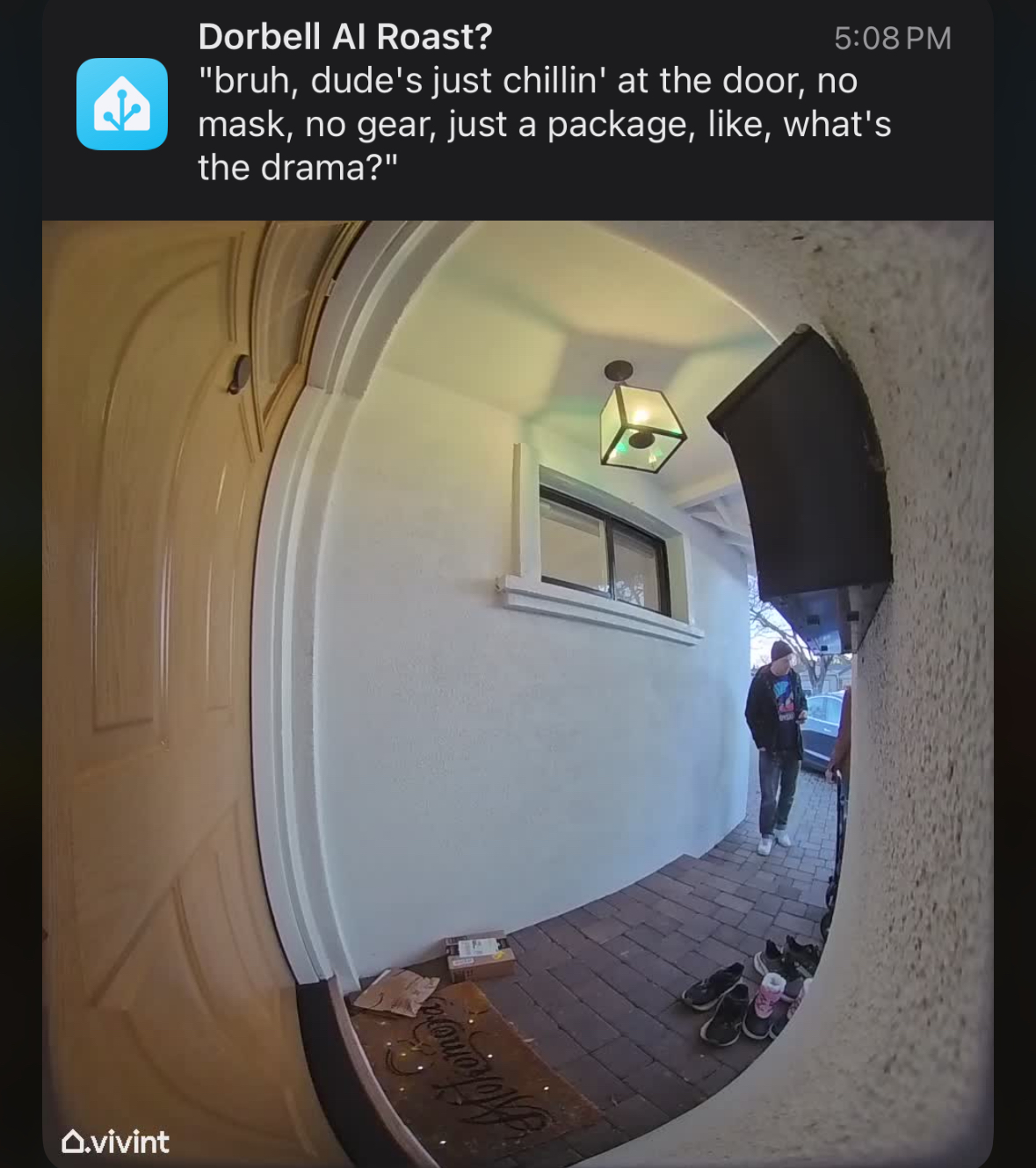
While 100% self-hosted on your own network on mostly open source stuff. On Linux the closed-source NVIDIA drivers are required for ollama to be useful.
I don’t know what MCP is, I don’t know what “local inference” means and I don’t give a shit and that’s my problem professionally, but not personally. I want shitty automated jokes about people at my door delivered to my phone within a few mintues maybe. I don’t know in any detail what llama3.2-vision means and how it compares to anything else listed on ollama models lists. I’m not a luddite, I’m just a human bean and not super excited about techno-fascists sending obviated labor to prisions via a few trivial intermediate steps.
- Run Home Assistant on a NUC in your closet or garage, your “MPoE.” Don’t think about it.
- Have fun gaming on a PC with a “decent” (read: great) GPU.
- Use your PC as a space heater to give some laughs.
Get to the point:
I’d been considering buying an additional mini PC from my ~$1K ASUS NUC 14 Pro with 128G-fuckin-B of RAM, a ~$2K AMD Ryzen AI Max+ 395 system like the Framework Desktop due to its unified memory, giving the integrated GPU something like 72G-fuckin-B of VRAM. But I already have a gaming PC with which also cost me $2K, so why can’t I try that paltry 16GB VRAM GPU of an RTX 5080? It works. Poorly and inaccurately, but it totally works well enough to give me a laugh instead of another headache.
The pieces, I think:
- Run Home Assistant on some rando place, nobody cares where just do it it’s fun to make your lights turn off at bedtime.
- Enjoy gaming on a PC and forego the budget anguish of 2025 PC gaming with 60%+ of the build cost being solely the GPU.
- Have a doorbell camera or some other fuckin’ camera, I don’t give a shit. This is obviously not doorbell specific.
- Resign to the fact that you are not gaming on your PC as much as you thought you were.
- Use that now-slack capacity of your GPU just in case your cameras need some shitty AI text to accompany them.
- Be a bit more patient, you’re using your shit-ass home server and your shit-ass gaming PC’s maybe-not-otherwise-utilized GPU.
Run Home Assistant on some rando place
Nobody cares where just do it. It’s fun to make your lights turn off at bedtime. I’m not Google, figure this out on your own.
Enjoy gaming on a PC
This is increasingly difficult with hardware spread tripping myriad bugs, component costs blowing through every ceiling, and your day job also being glued to the same chair, keyboard, monitor, and mouse. It’s a fuckin’ drag.
Have a camera to en-AI the things
I don’t give a shit, if you’re here you already have one because you’re me and nobody reads this.
Admit that your gaming PC’s GPU is largely unutilized
Get over it, you know I’m right. If I’m not then congrats on your retirement.
Self-Hosted GPU for Home Assistant ollama-vision summary of your doorbell camera
i.e. the point of this post, why did I write other shit? What an idiot.
First: Download ollama onto your gaming PC. Play around with it. It’s fun. Try to make it swear, try to make it say “boner” and all that. Have your fun.
Try out a “vision model.” I don’t know what that means other than I can supply an image URL from wikipedia or wherever and ask it to describe the image and it does. I can ask it to make fun of the image and it mostly does. I tried “llama3.2-vision” because 1) it says “vision”, and 2) “ollama” shares a lot of in-sequence letters with “llama” so I suppose they’re kind of thematically related (yes, I get that my employer, Meta, made LLAMA but that’s honestly all I understand as the similarity).
Second: Try out the Home Assistant integration for ollama pointing back to your gaming PC. Run it with this command in a terminal. PowerShell:
$Env:OLLAMA_HOST = "0.0.0.0:11434"; ollama serve
bash:
OLLAMA_HOST=0.0.0.0:11434 ollama serve
Then configure the integration to point to your gaming PC’s IP. Talk to it, use it as a chatbot. It works, it’s not amazing, but it’s yours. Use it as a “conversation agent” for HA’s “Assist” instead of their own or OpenAI. Ollama is “free” as in “it’s winter and my energy bill goes to heat anyway, so sure power up that RTX 5080 space heater.”
Third: Throw away the ollama integration. It was fun, but that’s not why you’re here. You’re here to automate, not to chat. Use the ollama_vision integration in HACS. And VERY CAREFULLY read the section on “Events”: https://github.com/remimikalsen/ollama_vision/?tab=readme-ov-file#events. Point it at your gaming PC. If you don’t know what model to use, neither does anybody else except for the mega fans. NOBODY ELSE CARES, folks. I picked llama3.2-vision and it works. I don’t know why, but it works. I suppose it’s because it says “llama” and “vision?” I don’t care.
Fourth: Create an automation to manually send a Wikipedia hotdog image to ollama-vision when you manually force the automation to run. Play with it. Change the URL around a lot. Try the not-a-hotdog thing, whatever. Get this working first. In order to do so, you’ll need 4 things open at once: ollama in powershell, Home Assistant automation editor, Home Assistant event subscribing to ollama_vision_image_analyzed (not obvious in any docs), and the Home Assistant logs. For the Home Assistant automation you’ll want something like this for the full automation:
alias: hotdog
description: ""
triggers: []
conditions: []
actions:
  - action: ollama_vision.analyze_image
    metadata: {}
    data:
      prompt: Is this a hotdog?
      image_url: >-
        https://www.w3schools.com/html/pic_trulli.jpg
      device_id: XXXXXXXXXXXXXXXXXXXXXX
      image_name: hotdog
Hint: that wikipedia hotdog URL doesn’t work but https://www.w3schools.com/html/pic_trulli.jpg does and it’s not a hot dog nor a penis.
Errors I hit:
- Home Assistant logs showed an HTTP 403 error when fetching an image by URL (like the Wikipedia hotdog image). Solution: use a different test image URL.
- Formatting yaml is fuckin’ dumb so of course everything is always wrong at first. Solution: git gud.
- Can’t see how it all hops across from manual press -> image fetch -> ollama GPU stuff -> notification. Solution: really seriously open all 4 of those things in one screen, 1/4 each.
Fifth: Once you have not-a-hotdog working, you should see something in the Home Assistant event subscription UI on ollama_vision_image_analyzed like this:
event_type: ollama_vision_image_analyzed
data:
  integration_id: XXXXXXXXXXXXXXXXXXXXXX
  image_name: hotdog
  image_url: https://www.w3schools.com/html/pic_trulli.jpg
  prompt: Is this a hotdog?
  description: >-
    No, this is not a hotdog. This is a picture of a traditional Italian village
    called Alberi, located in the region of Pugli in Italy. The village is known
    for its unique architecture and is often referred to as the "trulli"
    village. The trulli are small, round, and cone-shaped houses made of stone
    and are typically found in this region. The village is also known for its
    beautiful scenery and is a popular tourist destination.
  used_text_model: false
  text_prompt: null
  final_description: >-
    No, this is not a hotdog. This is a picture of a traditional Italian village
    called Alberi, located in the region of Pugli in Italy. The village is known
    for its unique architecture and is often referred to as the "trulli"
    village. The trulli are small, round, and cone-shaped houses made of stone
    and are typically found in this region. The village is also known for its
    beautiful scenery and is a popular tourist destination.
origin: LOCAL
time_fired: "2025-12-07T05:55:21.819316+00:00"
context:
  id: XXXXXXXXXXXXXXXXXXXXXXXXXXXXX
  parent_id: null
  user_id: null
Here your important information for the notification is “image_name” and “final_description”. You set “image_name” in the ollama-vision integration.
Sixth: Make an automation which triggers on your doorbell or motion, don’t care, and takes a camera snapshot. Then send that camera snapshot over to ollama-vision. For example, the full YAML for this trigger->ollama-vision automation is:
alias: Poke ollama vision
description: ""
triggers:
  - trigger: state
    entity_id:
      - binary_sensor.hotdog_motion
    from:
      - "off"
      - "on"
conditions: []
actions:
  - action: camera.snapshot
    metadata: {}
    data:
      filename: /config/www/snapshots/hotdog.jpg
    target:
      entity_id: camera.doorbell
  - action: notify.mobile_app_your_phone_name
    metadata: {}
    data:
      message: Motion at the hotdog
      data:
        image: /local/snapshots/hotdog.jpg
  - action: ollama_vision.analyze_image
    metadata: {}
    data:
      prompt: Is that a hotdog?
      image_url: >-
        http://homeassistant.lan:8123/local/snapshots/hotdog.jpg
      device_id: xxxxxxxxxxxxxxxxxxxxx
      image_name: hotdog
mode: single
This does a few things:
- triggers when the hotdog camera motion binary sensor switches from off to on (when there is motion detected).
- without condition (not a great idea)
- snapshot the camera to a location which is AN OPEN URL FOR ANYTHING AUTHENTICATED TO HOME ASSISTANT (also not a great idea)
- Notify your phone with that image so you can refer to it later
- Huck it off to your gaming PC’s ollama to hopefully maybe describe it unless you’re gaming.
Seventh: [EDIT] This is NOT separately, I learned how wait_for_trigger in automation actions lists then can have a trigger type of event which lets a later action reference a template value of wait.trigger.event. The prior version of this said to make an additional automation to catch the response. No need.
However, if you want to try it out to play with it, because this is all supposed to be fun to begin with, you’ll want to unpack the response event:
event_type: ollama_vision_image_analyzed
data:
  integration_id: XXXXXXXXXXXXXXXXXXXXXXXX
  image_name: hotdog
  image_url: https://www.w3schools.com/html/pic_trulli.jpg
  prompt: Is this a hotdog?
  description: >-
    No, this is not a hotdog. This is a picture of a traditional Italian village
    called Alberi, located in the region of Pugli in Italy. The village is known
    for its unique architecture and is often referred to as the "trulli"
    village. The trulli are small, round, and cone-shaped houses made of stone
    and are typically found in this region. The village is also known for its
    beautiful scenery and is a popular tourist destination.
  used_text_model: false
  text_prompt: null
  final_description: >-
    No, this is not a hotdog. This is a picture of a traditional Italian village
    called Alberi, located in the region of Pugli in Italy. The village is known
    for its unique architecture and is often referred to as the "trulli"
    village. The trulli are small, round, and cone-shaped houses made of stone
    and are typically found in this region. The village is also known for its
    beautiful scenery and is a popular tourist destination.
origin: LOCAL
time_fired: "2025-12-07T05:55:21.819316+00:00"
context:
  id: XXXXXXXXXXXXXXXXXX
  parent_id: null
  user_id: null
Now that you see the event structure, you can adjust your prompt, text_prompt, and grab the final_description from the waited event plus the image URL from the camera snapshot and send a mobile notification. Remember, notification structure is like this:
  - action: notify.mobile_app_derp
    data:
      message: |
        {{ wait.trigger.event.data.final_description }}
      title: Is there a hotdog at the door?
      data:
        image: /local/snapshots/{{ imgname }}
In this additional automation you grab the event data and put it into a notification. Use wait.trigger.event.data.* (in a prior version of this post I didn’t know about the wait object after wait_for_trigger) fields in conditions and message content/title.
Here’s my whole fuckin’ thing, paraphrased to ask if there is a hotdog at the door:
{% raw %}
alias: Doorbell motion -> is it a HOTDOG?!
description: ""
triggers:
  - trigger: state
    entity_id:
      - binary_sensor.doorbell_motion
    from:
      - "off"
      - "on"
conditions: []
actions:
  - variables:
      imgname: doorbell_{{ now().strftime("%Y%m%d_%H%M%S") }}.jpg
  - action: camera.snapshot
    metadata: {}
    data:
      filename: /config/www/snapshots/{{ imgname }}
    target:
      entity_id: camera.doorbell
  - delay:
      seconds: 1
  - action: ollama_vision.analyze_image
    metadata: {}
    data:
      prompt: >-
        Describe any hotdogs in *EXTREME* detail, otherwise describe anything out
        of the ordinary in the image. If there is nothing remarkable, then do
        shut the fuck up. Image is from a doorbell camera. Mix in if there are
        or are not any security concerns in the image (weapons, ill intent,
        police, etc) as the image comes from my doorbell camera.
      image_url: http://homeassistant.lan:8123/local/snapshots/{{ imgname }}
      device_id: fuckshit
      image_name: hotdog
      text_prompt: >-
        Respond always in highly informal genz/gen-alpha slang, swear a lot, and
        be silly. Is there a goddamn hotdog or not? You 100% can roast, swear and use
        slang. Now make this description extremely terse:
        <description>{description}</description>. This will go in a mobile phone
        notification, so 50 words **ABSOLUTE MAXIMUM**
      use_text_model: true
  - wait_for_trigger:
      - event_type: ollama_vision_image_analyzed
        trigger: event
    timeout:
      hours: 0
      minutes: 1
      seconds: 0
      milliseconds: 0
    continue_on_timeout: false
  - condition: template
    value_template: |
      {{ wait.trigger.event.data.image_name == "hotdog" }}
  - action: notify.mobile_app_derp
    data:
      message: |
        {{ wait.trigger.event.data.final_description }}
      title: Dorbell AI Roast?
      data:
        image: /local/snapshots/{{ imgname }}
mode: single
Tadaaa:
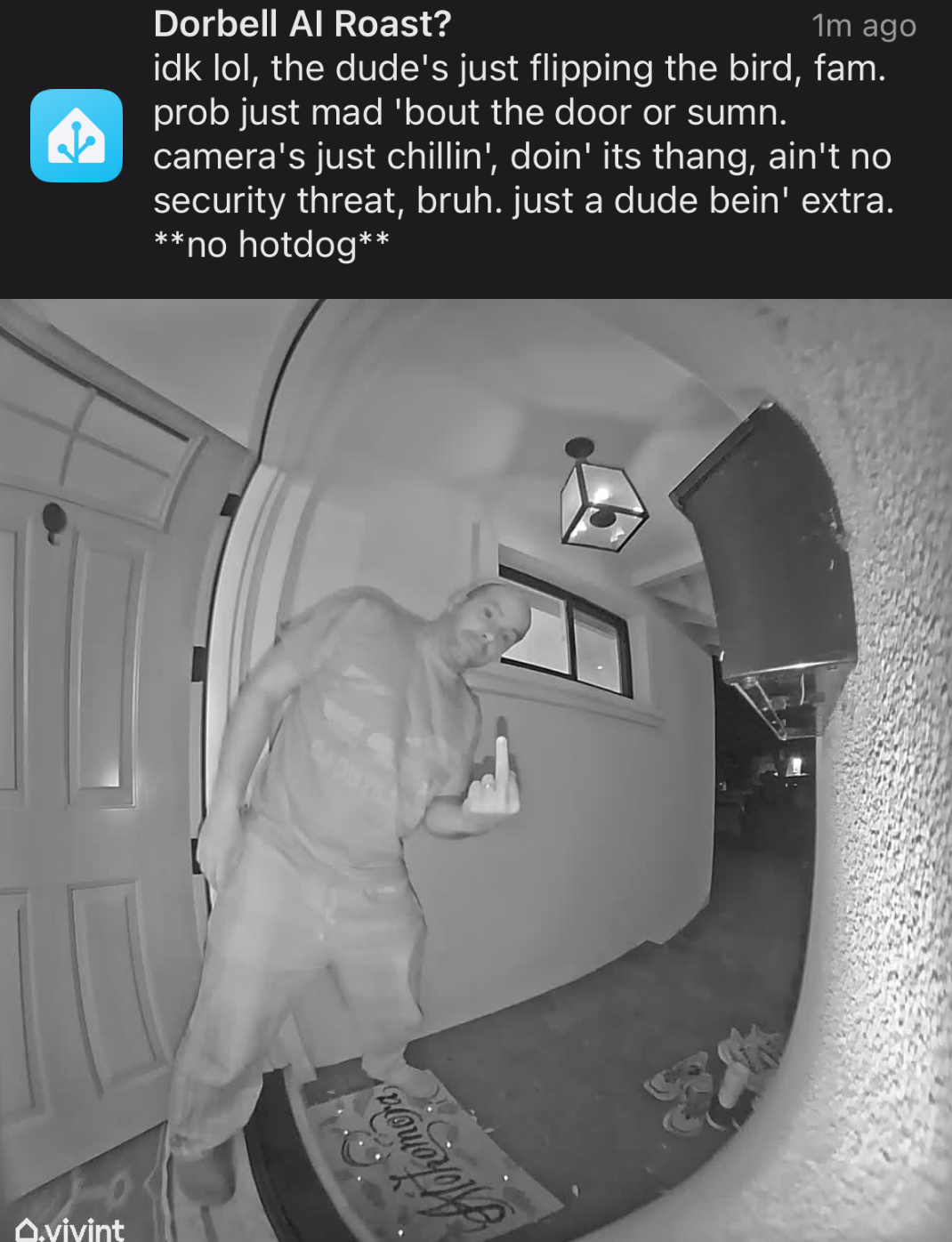
Be patient, relax your expectations
As cool as it seems to get a phone notification with a custom-prompted vision-llm AI bot telling you caustic or pithy quips to your phone, please rember that your wallet has been doing just fine without that for a good 100,000 fucking years.
Remember that modern AI’s hallucinate all the time and so it’s dangerous to rely on their output for anything important like physical safety.
Remember that you don’t actually give a shit if it takes 2s versus 2 minutes to get a shitty AI generated joke about what’s at your door or on your camera. The point is the laugh, not the latency. Don’t pay for latency when what you want is the laugh.
Do you care about what an AI describes at your camera while you’re playing your game, using your GPU? No. If you do: no you don’t, shut up.
The Cost of 4K 60fps video storage, a dad's perspective
February 20, 2021
I’m a dad, now! Yay! My son is awesome. Being a dad during the COVID-19 pandemic is awful in myriad ways. It has silver linings, but this post isn’t about that.
I ran out of iCloud storage
I’ve been taking 4K 60fps videos of my son doing things which I find earth-shattering: looking at me, sneezing, babbling, laughing, eating, even bathing and peeing LOL. I’m taking these in 4k 60fps on my iPhone whatever (11 pro, midnight green for sure) which offers a simple set of toggles to do so. Obviously, recording video at 4x the resoultion and 2x the framerate will likely cost in the ballpark of 8x in storage according to napkin math. This is the same ballpark as an order of magnitude increase in storage for video. It’s not, but my napkin math instinct should have informed me.
These toggles are, to my new dad perspective, future proofing my memories. Back in the days before the pandemic, people would have high school graduation parties. At my own, my parents lovingly trawled through the family archives to unearth the most dubiously endearing but truthfully embarrassing photos and videos they could find. Great success on there part, if memory serves me well.
I want a trove of ancient videos to share with the world when my son hits these comming of age milestones. I want to show him how I’m such an idiot that I sacrificed future flexibility on my part, fitting-in better on his part, and generally not being embarrassed on all parts. I’m already so proud of him, I cannot imagine how proud I’ll be if he has one of these shindigs to celebrate a major achievement among his peers. Him taking a crap is a major achievement in my book, so I’m just gonna be constantly gushing about how awesome he is. I have to keep that discount for myself.
So, I ran out of iCloud storage, of course. Who tf doesn’t? That’s the entire point of iCloud storage: to run out and pay apple for more “backups.” This got me thinking, how am I gonna save these 4k 60fps videos? How am I going to archive them and then retrieve them at a later point? Well, let’s start with Apple’s estimates of storage costs of these videos. The iPhone settings app has estimates listed under the camera details:
A minute of video will be approximately:
- 40 MB with 720p HD [editorial: LOL @ HD] at 30 fps (space saver)
- 60 MB with 1080p HD at 30 fps (default)
- 90 MB with 1080p HD at 60 fps (smoother)
- 135 MB with 4k [editorial: why no “UHD”?] at 24 fps (film style) 🙄
- 170 MB with 4k at 30 fps (higher resolution)
- 400 MB with 4k at 60 fps (higher resolution, smaller)
1080p @30fps is 60MB/minute or 1MB/s. 4k @60fps is 400MB per minute, or 6.66667whatever MB/s. Let’s invert it so we don’t have repeating decimals, they’re annoying in text: 1080p @30fps is 0.15 times the size of 4k @60fps. Cool, 8x (or 1/0.125x) was pretty close! Let’s just blame the difference as a rounding compromise at Apple to keep the camera settings nice and neat, though imprecise. We’re still gonna use their numbers for now, though. My napkin math is supported by only one scientist.
How much video do I take?
Well this is highly variable, but if there’s one thing I learned to get my Physics degree, it’s that you can approximate the shape of a cow as roughly a sphere. So let’s approximate. Let’s see how much I’ve taken at 4k 60fps so far:
$ ls -l /mnt/lilstorage/Videos/Other/iPhone/2021-02-20/|wc -l
310
Ok, 310 videos. Let’s see how to get their duration. (googling…) looks like mediainfo will do it, so sudo apt-get install mediainfo or whatever, then away we go:
$ for f in *; do mediainfo $f | grep ^Duration | head -1; done
... snip
Duration                                 : 1 min 4 s
Duration                                 : 50 s 277 ms
... snip
Great, the tool unhelpfully assumes that I, a human, am not a computer. Ends up humans can compute, so that’s annoying. Oh, but it supports * args and has a JSON output option:
$ mediainfo --Output=JSON * | jq .
... snip uhhhh on second thought, you don't want to see this
Ok, so it has some structure. For each file, it outputs 3 “tracks”: general, video, and audio. But it already looks a bit askance. I need to compare a 30fps and 60fps file, a 4k and a 1080p file, and maybe even the full cross to understand this tool. One 4k 60fps file I have is named IMG_4165.MOV, and a 1080p 30fps file is IMG_3603.MOV. Let’s compare their outputs:
$ mediainfo --Output=JSON IMG_4165.MOV IMG_3603.MOV | jq .
... snip
FrameRate
Duration
Height
Width
... snip
Yeah, I crapped out, but that’s the point at least: it’s getting a bit more complicated just to tally up the duration of 4k vs 1080p videos I’ve taken. I’ll plop this out to a file and reat it into ipython:
$ mediainfo --Output=JSON * | jq '.[].media.track[1] | "\(.Width) \(.Height) \(.FrameRate) \(.Duration)" | sed 's/"//' > ~/derp.txt
jq cares about quotes, I don’t.
Then let’s load it up and group things together:
#!/usr/bin/env python3
derp = open("derp.txt", "r").readlines()

from collections import namedtuple, defaultdict

vidfile = namedtuple("vidfile", "width height framerate duration")
vidfiles = [vidfile(*l.strip().split(" ")) for l in derp]


def framebucket(fps):
    fps = float(fps)
    if fps < 20:
        return "timelapse"
    elif fps < 26:
        return "24"
    elif fps < 35:
        return "30"
    elif fps < 65:
        return "60"
    else:
        return "slowmo"


vid = namedtuple("vid", "res framebucket duration")
vids = [
    vid(int(v.width) * int(v.height), framebucket(v.framerate), v.duration)
    for v in vidfiles
]

summary = defaultdict(int)
for v in vids:
    summary[f"{v.res} @ {v.framebucket}"] += float(v.duration)

for k, v in sorted(summary.items()):
    print(k, v)
This outputs that I make 5x more 1080p @ 30fps videos than 4k @ 60fps videos:
1701120 @ 24 15.255
1701120 @ 60 42.568999999999996
2073600 @ 24 896.58
2073600 @ 30 10020.490000000009
2073600 @ 60 313.47099999999995
2073600 @ slowmo 18.997
2764800 @ 30 1.8079999999999998
8294400 @ 30 233.902
8294400 @ 60 2065.2369999999996
921600 @ 30 632.647
Ignore the rounding errors, you’ll see 10020.5 and 2065.237 for each, respectively.
How much video will I take?
I confess: I take a bunch of very short videos of specific interactions. I’m trying to take longer videos, but it’s hard to do that while the subject tries their best to get into trouble.
Well my son is 9 months old (minus 3 days) and I’ve taken lots. My phone broke and I had to swap-up when he was only 1 month old and that’s what these files cover. So 10020 seconds in 8 months of 1080p 30fps video and 2065 seconds of 4k 60fps video, or on rough average: 0.347917 hours per month of 1080p 30fps and only 0.07170138 hours per month of 4k 60fps.
If we pretend I keep my habit as-is, by the time he’s 18, I’ll have 75 hours of ancient 1080p 30fps video and a measly 15.5 hours of less-ancient 4k 60fps video. Decent to choose from for a simple carousel style loop.
Phew! I was worried I’d need to factor in how 1080p -> 4k -> 8k etc progression will happen and estimate filesize growth over time.
By Apple’s estimates, my 15.5 hours of 4k 60fps video will take only about 360GB to store. Easy peasy!
Technology progression costs more storage!
But wait, I do need to estimate the progression! I don’t have the energy to estimate, so I’ll over-estimate by supposing my entire archive is best approximated as being 400MB per minute (nullifying the fun I just had): 2TB. Big whoop. I guess I won’t get that NAS and will just shove them into S3 glacier for now.
Mobile App Operability
July 15, 2020
Mobile apps often get a bad rep from backend infrastructure people. Rightly so when comparing operability between backend infrastructure services and mobile applications. First, so that we’re on the same page: operability is trait of a software system which makes detection, remediation, and anticipation of errors is low-effort. What is this for mobile applications? Well… it’s the trait of a mobile application which makes detection, remediation, and anticipation of errors is low-effort, of course. Mobile apps are software systems. They’re usually best modeled as trivially parallelized distributed software systems which just happen to run on mobile devices rather than on owned infrastructure.
Mobile operability is the trait of mobile apps which makes detection, diagnosis, remediation, and anticipation of errors low-cost and low-effort.
Errors here can be anything unwanted: crashes, freezes, error messages, lacking correct responses to interactions, and even having incorrect responses to interactions.
Detection
To consider what good operability is for mobile apps, we need a way to detect these errors. To detect errors, we have to record them and deliver that record to a detection system. That system does not have to be outside of the app! In fact, it’s best if your app has a self-diagnostic mechanism built-in to help understand errors in a way that respects your users’ privacy. Common detection mechanisms are crashlytics, the Google Play console Vitals reports, and app reviews and star ratings. The app usage analytics system should also be used for collecting errors, though you should use a separate analytics aggregation/processing method here to ensure your error data has as little user attributes as possible. Why not use the same one? Well with normal app analytics, you’re subject to GDPR, deletion requests, and heightened security expectations. Errors shouldn’t be like this, errors should be pared down so far that you can safely and securely retain them forever.
Detection is focused on efficiently detecting occurrences of errors, not making them easy to debug.
Each error category may have different and multiple avenues of diagnosis. Some likely have none at all, which is why I’m writing this. There are three general mechanisms of delivering errors:
-
3rd party: things which you don’t own, manage, nor control like Google Play console Vitals, app store reviews, star ratings, etc.
-
Out-of-band: your app aggregates, interprets, and potentially sends error details to a separate backend system than what your app primarily interacts with. Common examples are analytics systems, custom crash interpreters, and local error aggregation.
-
In-band: your app includes some details of errors within the primary client/server RPC, your server may include some global error information within the primary RPC’s as well.
Diagnosis
There is a middle ground between zero context and debug-level context. You need to know the stack trace, view hierarchy, and some information about the device and user which stand-out to help diagnose a problem. You can quickly detect that a crash happened, but diagnosing why may require far more insight. The middle ground is in the aggregable context of an error: stack trace, activity or view, device type, etc. You should not require a full core dump for understanding that the app crashed, that’s for understanding why.
Diagnosis requires great context for the error. This context can come from a few different places:
-
The app itself: it can submit an error report to you.
-
The backend(s): maybe your web servers sent an HTTP 500 response which caused the user-visible error.
-
The session, user, or customer: if you can determine which account experienced a specific error, you may be able to reconstruct context from their user data.
Ever-increasing context is not the path to perfect diagnosis, there should always be a trade-off between increasing context and value to the user. If you want to collect full core dumps, remember that transmitting 4GB+ of data over a cell network can bankrupt some people, so don’t do it. Adding the device manufacturer or even device model to the error report may give you critical context for some problems.
Every error may be different. There’s no magical set of fields to supply in an error to give sufficient context to efficiently diagnose. You, as the app developer, should have the best idea of what pieces of context will be most useful in each subsystem of your app. For example, if you’re implementing the password change flow, you may want to include metadata about the account’s password: how old was it, how many times has this person changed it recently, or even how they arrived at the screen if you have multiple paths like an email deep link.
Anticipation
There are many scenarios where a quantity in the application may be increasing or decreasing toward a critical threshold: resident set size, battery power, CPU cycles, cloud storage quota, etc. There are a few strategies to know if these are about to produce an error:
-
High/low water marks
-
Quotas
-
Correlational estimates: flow complexity, runtime, user sophistication, and others I have yet to learn or hear about.
High/low watermarks: if your application has a finite amount of a resource, you should implement it so that it operates optimally under a low amount of the resources. Once it reaches a threshold of usage of the resource, it can start disabling or degrading functionality. It’s common to implement at least two thresholds here: high and low watermarks. If the low watermark is reached, the app can start to refuse new allocations into the resource pool, or delay unnecessary work. The app should still generally be functioning as expected, though maybe a bit slower. Upon reaching the high water mark, the app should outright disable functionality and evict low priority resource usage.
Example: Let’s say an app takes, uploads, and views images. One of the resources it’s sure to use is local disk: to cache captured images, cache or even synchronize downloaded images, and to cache different image resolutions or image effect applications. If we set a low watermark of 1GB local storage, the app can switch to a mode where it does all processing on only previously allocated image files. This prevents some increase in storage used. However, if we hit a high watermark, we could have the app actively de-allocate images in storage and force re-fetching, in-memory processing, or even decreased resolution or effect support.
Quotas: these follow a similar concept as watermarks, but they have an inverse usage expectation. Nothing should change in behavior until the quota is met, at which point there can be a user flow for increasing the quota or decreasing the usage.
Correlational estimates: try not to use these. If a critical error occurs, once the dust settles and everything is recovered, it’s common to wonder if you could have seen this coming. One common question in the blameless post-mortem is “Was there a leading indicator which could have predicted this issue?” This is grasping at straws. If your application is so complex that there is no direct indicator which you can add, nor but you can fix, you’re already in too deep without proper operability. Push back against adding an alert on a correlational leading indicator. Instead, try to reduce the complexity of the app around the failure.
Remediation
If we’ve detected and diagnosed an error, how do we fix it? This is where things get fun :) The general idea is to use everything at your disposal! The well-trod areas are:
-
Backend remediation
-
In-app feature flags
-
Hotfix
I’d like to urge you to consider another: a failover app wrapper. The failover wrapper is not just a blanket exception handler, it’s as separated as possible from the icky, risky, and most problematic part of your app: your code (mine included!). There are many ways to go about this and none of them are sufficient, otherwise it would be a fail-safe. Nothing in your application’s logic should be able to get into such a bad state that the best recourse available is to harm the core user experience. You can implement this as a stale view of data in a separate process, a babysitter process which spawns your main application’s surfaces, but the best available options are indeed to use a separate process. Within your main application’s logic, you can have a mechanism of “crashing” which only exits the child process, not the wrapper which is still able to provide some useful functionality to the user. The IPC between the processes to synchronize the user’s state could be done all sorts of ways, but again needs to be overly simple so that the failover wrapper doesn’t collect the same bugs as the main app.
Backend remediation is what we end up with when we don’t plan for emergencies as we write the app. The backend sends some special configuration telling the app to disable something, or sends response which was carefully crafted to side-step the problematic app code. You’ll end up with some of these, and that’s a good thing.
In-app feature flags deserve a whole separate post. I’ll also split them out into two categories: killswitches and dials. The general idea here is to implement graceful degradation within the app. Similar to the idea above about high/low watermarks, if the app encounters some critical error, the app can have a mechanism to reduce or remove functionality. One simple example is to crash when detecting a privacy error. Rather than show any activity with a privacy problem, just exit the app. This is the bare minimum, though, because how can you fix the privacy problem and stop the app from crashing?
Killswitches: these are simple boolean indicators which the app checks any time it exercises some specific functionality. The functionality is skipped if the killswitch is on. Your implementation may vary in the use of true vs. false to indicate on or off, but make it consistent. These parameters should be delivered through an out-of-band RPC to configure your application, ideally changing while the app is running. Distributing killswitches is a fun distributed systems problem with many complex solutions, just be sure that you’re comfortable with the coverage and timeframe of your solution, be it polling, pushing, swarming, or other fancier options I need to learn about.
Warning about killswitches: if you have killswitches for very small pieces of your application, you will end up exercising code which is behind tens or hundreds of conditional killswitch checks. Nobody ever tests every combination of killswitches, because they are killswitches. Use A/B testing to control the on/off choice of these smaller, less disaster-prone surfaces of your application. Killswitches should be reserved for disabling large pieces of functionality.
Dials: some functionality in your application can scale up and down in demand or resource usage, both on the client and on the backend. In the example of watermarks above, image resolution could be a dial from the client to reduce resource usage on the client or on the server. Video resolution, time between polls, push batching, and staleness of data are all examples of dials which you can use to remediate huge categories of errors if you support dialing to 0.
Hotfix: you can always ship a new build of your app with the offending bug fixed. This takes a long time and may take a whole team of people to produce. Even then, you’re at the mercy of the app stores, which may take days or even weeks to finally push your update. Just be sure only to do a true hotfix: fix the code from the very commit used to build the affected version.
The Perfect App
Remember: “The perfect is the enemy of the good.” Having a product is more important than having a perfectly operable product. The flip-side also holds: having an operable product is more important than having a perfect product. Don’t go all-in on either, exercise the balance with moderation. Learn from your mistakes. Just as a competitor is about to eat your lunch by getting to market sooner, another competitor may swoop in when you inevitably have a disaster and don’t have the operational capability to recover.
I don't write
October 30, 2019
I don’t write, and I often get feedback that it’s hurting my career in software engineering.
Disclaimer: I’m butthurt about struggling to advance in my career.
The following is what happens when I try to write anything (this included):
- I think I have a good idea
- I flesh it out into fairly broad strokes
- I start writing
- I doubt my idea
- I fear being bullied
- I delete what I wrote
Why does this hurt my career? Because I’m a software engineer. We conflate visibility and productivity in this industry, thinking the engineer who writes Medium articles all the time must know their shit because they seem to have quite a following.
I’m not saying I shouldn’t have to broadly communicate. There’s obviously value in broadly communicating. It’s why the fucking printing press was a world-changing invention. I’m not talking about spreading the Good News here, though. I’m talking about rehashing architecture choices, workflow recommendations, production operations plans, and shit as banal as unit test coverage. Why would I bore the world or my peers with things that are trivial to search for? How could that possibly be valuable? How is that required for me to “level up”?
I’d like to explore why I don’t write, particularly for work. So let’s look at my steps of abandonment.
How to Tank Any Technical Career by “Not Communicating Enough”
I think I have a good idea
We all have good ideas. We’re humans. Each of us has a unique experience and can share ideas which others haven’t had. Stupid simple. I don’t have confidence to call many of my ideas good, but I figure some probably are good.
I flesh it out into fairly broad strokes
This is actually a pretty quick process: trim it down to the bare essentials, don’t demean anybody’s work, have a strong recommendation or request of the coworker who reads it. Easy peasy.
I start writing
For larger documents or plans, where more context and guiding is needed, I go off the rails pretty easily. I get bogged down in minutiae. I start trying to cover every angle of technical attack this thing may face.
I doubt my idea
As I’m writing a defense without an attack, I start to convince myself that it’s not worth writing. That it contradicts something else I hadn’t seen. That it’s obvious, not novel. That I’m missing some piece of context that makes the whole thing moot.
I fear being bullied
I can hear it now: “well you probably just can’t take feedback very well if you always think it’s bullying.” Sure, fine. There’s nothing I can say to that. It’s just shutting down a conversation. If that’s what you’re thinking, then this isn’t for you. Otherwise, you may have experienced this. The Super Sr. Hon. Principled Engineer XIV stepping in to the idea you had and shitting all over it. Not because they have a better idea, but because they can shoot mine down without bothering to consider it. Because one of the key words I used matched a thing they own. Because I recommended using a system they didn’t write. Because they can.
I delete what I wrote
Not this time!
That’s all, I mostly needed to vent. But in the spirit of not deleting what I wrote, here are snippets from earlier versions of what I thought I wanted to say…
I’m talking about advancing a career through sheer confidence. Faking it until you make it seems to be a requirement in software engineering career progression.
I do this personally, for nerd stuff or regular-ass personal stuff. I have a handful of partial drafted things I’ve written out. One weird thing about the personal ones is the audience. The audience is always me. I can’t write advice since I’ll just doubt the value of it. I mean hey, it didn’t help me the first time around, right? So I write to straighten my thoughts, to categorize and reinterpret.
I do this abandonment process at work almost every day. Let’s say I have an idea, or a direction shift, which I need a lot of people to get on-board with before the wheels come off of the product/app/website/project/whatever. So, I say it in a chat and a couple people agree, then I say it more broadly and get complete and utter silence. I could bring it up in a meeting, but I usually talk myself down from that by pointing out what happens every time I do: people say that’s a good idea, pretend it takes 10x the engineering time it does, and proceed to politely tell me to go fuck myself by saying that this next deadline is more important.
This has trained me not to share my ideas widely. It has taught me that my ideas are bad.
So I instead have 1:1 or small group conversations about technical direction, driving everybody to a higher bar and generally getting people excited to work on the most boring stuff possible: reliability. I do this a lot at work, pointing out subtle tactical changes and creating a new vision of whatever it is I’m working with.

